On this page
I recently had the task of performing a code review on a project using NextJS, TypeScript, Amplify & AppSync.
The developer had opted for TypeScript because it would "prevent runtime errors for both backend and frontend". I'm a fan of TypeScript and I do believe it can help in this regard, however, the implementation on the frontend used the :any type liberally. In reality, TypeScript wasn't helping to prevent runtime errors that much.
However, it got me thinking. The AppSync GraphQL schema is strongly typed. When using TypeScript the Amplify CLI does generate an API.ts types file which could be used to provide a strong contract between the backend and the frontend. I decided to dig deeper.
It turns out that the types generated by Amplify have some unwanted information when it comes to using the types on the front-end. Specifically nullvalues and __typename properties. Additionally, we get back a data: object because "the types returned by the graphql function are a mashup of GraphQLResult and Observable since this same function is used for both".
There is a way around these problems and this is a tutorial on how to get ….
Init NextJS App
https://nextjs.org/docs/getting-started#setup, opens in a new tab
npx create-next-app
https://nextjs.org/docs/basic-features/typescript, opens in a new tab
touch tsconfig.json
Next now knows you want a TypeScript project if you try to run it will tell you to install types, so let’s do that:
npm install --save-dev typescript @types/react @types/node
now run the app and the tsconfig.json file will get populated.
npm run dev
In short, we now have a NextJS app in TypeScript, we just need to start renaming .js files to .tsx
Init Amplify
If you haven't used Amplify before there are some prerequisites you may need to install and configure. See https://docs.amplify.aws/start/getting-started/installation/q/integration/react, opens in a new tab
amplify init
Follow the prompts (defaults mostly fine, I changed the following for NextJS specifically)
Source Directory Path: ./ (because NextJS doesn't have a src folder everything starts in the root) Distribution Directory Path: out (because if you build it will go in out folder. Though .next is also used it's not relevant right now as SSR is not supported in Amplify Console)
This will initialise a new Amplify backend.
? Enter a name for the project nexttsappsync
? Enter a name for the environment dev
? Choose your default editor: Visual Studio Code
? Choose the type of app that you're building javascript
Please tell us about your project
? What javascript framework are you using react
? Source Directory Path:  ./
? Distribution Directory Path: out
? Build Command:  npm run-script build
? Start Command: npm run-script start
GraphQL Folder
Ok our base stack is ready, lets add an API.
amplify add api
We'll choose GraphQLand it should be noted this isn't an ideal set up, it is JUST for tutorial purposes. In reality you should add proper authorization for your API.
? Please select from one of the below mentioned services: GraphQL
? Provide API name: todoapi
? Choose the default authorization type for the API API key
? Enter a description for the API key: todoAPIKey
? After how many days from now the API key should expire (1-365): 365
? Do you want to configure advanced settings for the GraphQL API No, I am done.
? Do you have an annotated GraphQL schema? No
? Choose a schema template: Single object with fields (e.g., “Todo” with ID, name, description)
The generated schema.graphql file uses a Todo model as follows:
type Todo @model {
  id: ID!
  name: String!
  description: String
}
Next lets configure amplify codegen
amplify configure codegen
In the generation target language we'll choose typescript
For the filepath we'll set graphql/**/*.ts because NextJS doesn't use a src folder
Enter the file name for the generated code: graphql/API.ts
? Enter the file name pattern of graphql queries, mutations and subscriptions graphql/**/*.ts
? Do you want to generate/update all possible GraphQL operations - queries, mutations and subscriptions Yes
? Enter maximum statement depth [increase from default if your schema is deeply nested] 2
? Enter the file name for the generated code graphql/API.ts
? Do you want to generate code for your newly created GraphQL API Yes
- generate into a
/graphqlfolder, including the API.ts file. - additionally add an APITypes.ts file (can be what you want)
Then export everything in an index.ts file. This provides a central point from where you can import all your API and Types. A single source of truth if you will.
GraphiQL
Lets create some ToDo items for the frontend to play with
amplify mock
You should see something like: AppSync Mock endpoint is running at http://192.168.86.161:20002
Open that link and you'll see GraphiQL. Let's create some data using mutations:
mutation MyMutation {
  createTodo(input: {name: "Put out the bins", description: "You know what to do again"}) {
    id
  }
}
Ok so we've created a few Todos, lets see them:
query MyQuery {
  listTodos {
    items {
      id
      description
      createdAt
      name
      updatedAt
    }
  }
}
In my case that yields:
{
  "data": {
    "listTodos": {
      "items": [
        {
          "id": "39e9cb83-d936-4b05-999d-61f412d57ecb",
          "description": "You know what to do again",
          "createdAt": "2020-11-25T10:21:39.407Z",
          "name": "Put out the bins",
          "updatedAt": "2020-11-25T10:21:39.407Z"
        },
        {
          "id": "dd2d975b-be52-4a23-8dfd-03e6a4a256ae",
          "description": "The best chore!",
          "createdAt": "2020-11-25T10:22:20.674Z",
          "name": "Hoover up lounge",
          "updatedAt": "2020-11-25T10:22:20.674Z"
        },
        {
          "id": "8bce419d-39d5-425b-ab45-00f731e0454e",
          "description": "You know what to do",
          "createdAt": "2020-11-25T10:21:31.577Z",
          "name": "Put out the recycling",
          "updatedAt": "2020-11-25T10:21:31.577Z"
        }
      ]
    }
  }
}
Note the structure of the returned JSON.
There is a data object, which has a listTodos object, which contains an items array. Each array item has properties that are defined by our strongly typed schema in schema.graphql. Additionally, some utility properties have been added automatically by Amplify, specifically createdAt and updatedAt
React
Ok, let’s get Amplify set up with our React App. First, we'll need to install Amplify and the UI
npm i aws-amplify npm i @aws-amplify/api-graphql
In pages/index.js add
import Amplify from "aws-amplify";
import awsExports from "../aws-exports";
Amplify.configure(awsExports);
Then rename the file from index.js to index.tsx.
npm run dev should show the app running on http://localhost:3000
Let's get things modified for our todo app. Remove the 4 anchor tags and replace with:
<div className={styles.card}>
<h3>Documentation →</h3>
<p>Find in-depth information about Next.js features and API.</p>
</div>
GraphQL Integration
Let's look at our graphql folder, it's got queries, mutations, subscriptions and the API.ts file from the codegen command.
Lets make our imports easier by creating the file /graphql.index.tsx and adding the following:
export * from './API';
export * from './mutations';
export * from './queries';
export * from './subscriptions';
We can now import our types and queries from the same place. Ok, let’s get our todos from GraphQL. In our pages/
import * as React from 'react';
import GraphQLAPI, { GRAPHQL_AUTH_MODE } from '@aws-amplify/api-graphql';
import {ListTodosQuery} from '../graphql'
Then we'll add some code to fetch our todos:
  React.useEffect(() => {
    const fetchTodos = async () => {
      try {
        const response = await GraphQLAPI.graphql({
          query: listTodos,
          authMode: GRAPHQL_AUTH_MODE.API_KEY
        })
        console.log(response);
      } catch (error) {
        console.log(error);
      }
    };

    fetchTodos();
  }, []);
If all went well you should see the exact same JSON response as we saw in GraphiQL.
Let’s get that logged response onto the screen.
First, we'll need to set some state management, we’ll just use React.useState()
  const [todos, setTodos] = React.useState(undefined);

  React.useEffect(() => {
    const fetchTodos = async () => {
      try {
        const response = await GraphQLAPI.graphql({
          query: listTodos,
          authMode: GRAPHQL_AUTH_MODE.API_KEY
        })
        console.log(response);
        setTodos(response.data);
      } catch (error) {
        console.log(error);
      }
    };

    fetchTodos();
  }, []);
update JSX to:
<div className={styles.grid}>
  {todos?.listTodos?.items.map((todo) => {
    return (
      <div className={styles.card}>
        <h3>{todo.name}</h3>
        <p>Find in-depth information about Next.js features and API.</p>
      </div>
    )
  })}
</div>
You should see the to-do items you added in GraphiQL on the web page.
This is super but this is still just JavaScript, we need to add some TypeScript love to it.
Tweak the GraphQLAPI code to use the generated type from API.ts
const response = (await GraphQLAPI.graphql({
  query: listTodos,
  authMode: GRAPHQL_AUTH_MODE.API_KEY
})) as { data: ListTodosQuery }
This tells the API query that we expect the returned data to match the type ListToDosQuery. If you look in the API.ts file you'll see it the type looks like this:
export type ListTodosQuery = {
  listTodos:  {
    __typename: "ModelTodoConnection",
    items:  Array< {
      __typename: "Todo",
      id: string,
      name: string,
      description: string | null,
      createdAt: string,
      updatedAt: string,
    } | null > | null,
    nextToken: string | null,
  } | null,
};
The API now knows what to expect. If you tweak the console.log after the response you'll see it has IntelliSense! response.data.listTodos.
That's super but when it gets down to the JSX the IntelliSense is lost. We can fix that by telling useState what types to expect.
const [todos, setTodos] = React.useState<ListTodosQuery | undefined>(undefined);
Here we've told it the same as the API to expect ListTodosQuery as the type but also that it could be undefined if we don't yet have any data.
Now if you go to the JSX and start typing you'll see all the same lovely IntelliSense!
e.g. {todo.name}
This is amazing but if you take a closer look at the IntelliSense in VSCode you'll see a lot of __typename entries. If you look back at the ListTodosQuery you note how that is indeed part of the type, but it's not some data that we desire when working in React, in fact, it's going to cause you problems further down the line. Let's clean that up.
DeepOmit tricks
Fortunately we can automate this clean up in a nice way that won't break as we amend our graphql.schema file.
Create a new file graphql/APITypes.ts and add the export to your graphql/index.ts file.
Now we need to add a few modules:
npm i ts-essentials this contains DeepNonNullable which will remove the null entries from the type.
Next create a new file graphql/DeepOmit.ts and paste in the following:
// TODO: ts-essentials does not support DeepOmit for __typename, using this instead util function instead
// https://github.com/krzkaczor/ts-essentials/issues/104

type Primitive =
  | string
  // eslint-disable-next-line @typescript-eslint/ban-types
  | Function
  | number
  | boolean
  | symbol
  | undefined
  | null;

type DeepOmitArray<T extends any[], K> = {
  [P in keyof T]: DeepOmit<T[P], K>;
};

export type DeepOmit<T, K> = T extends Primitive
  ? T
  : {
      [P in Exclude<keyof T, K>]: T[P] extends infer TP
        ? TP extends Primitive
          ? TP // leave primitives and functions alone
          : TP extends any[]
          ? DeepOmitArray<TP, K> // Array special handling
          : DeepOmit<TP, K>
        : never;
    };
Back in APITypes.ts do some imports:
import { DeepNonNullable } from 'ts-essentials';
import { DeepOmit } from './DeepOmit';
import {
  ListTodosQuery,
} from './API';
Then well use those imports on our GetTodoQuery to filter out the null entries and __typename
export type TodoType = DeepOmit<
  DeepNonNullable<GetTodoQuery['getTodo']>,
  '__typename'
>;
What we've done is create a TodosType which we can use instead in our React code.
We leave the ListTodosQuery in place because that does indeed use some of the information in the type definition but when it comes to mapping over our todo or creating a todo we do want the base type without the additional information.
Changing Schema
Ok, so what happens when we extend our schema.graphql file. Let's find out.
In schema.graphl add a completed flag.
The schema is now:
type Todo @model {
  id: ID!
  name: String!
  description: String
  completed: Boolean!
}
If you are running amplify mock still then you'll notice something neat, the code generation updates automatically as soon as you save the file. If you look in API.ts you see the new completed boolean in the type definitions.
What about APITypes.ts? Well, that file hasn't been updated but it doesn't need to. It just pulls in the updated types from API.ts and removes null and __typename.
Let's try this out, back in our React code and add the status of the completed flag in our UI and add something to the schema, say a description. Regenerate and note TypeScript already knows that your type was automatically updated. It was that easy, I literally did nothing it just appeared by magic.
Let’s add it to the React Frontend.
<p>{Status: ${todo.completed}}</p>
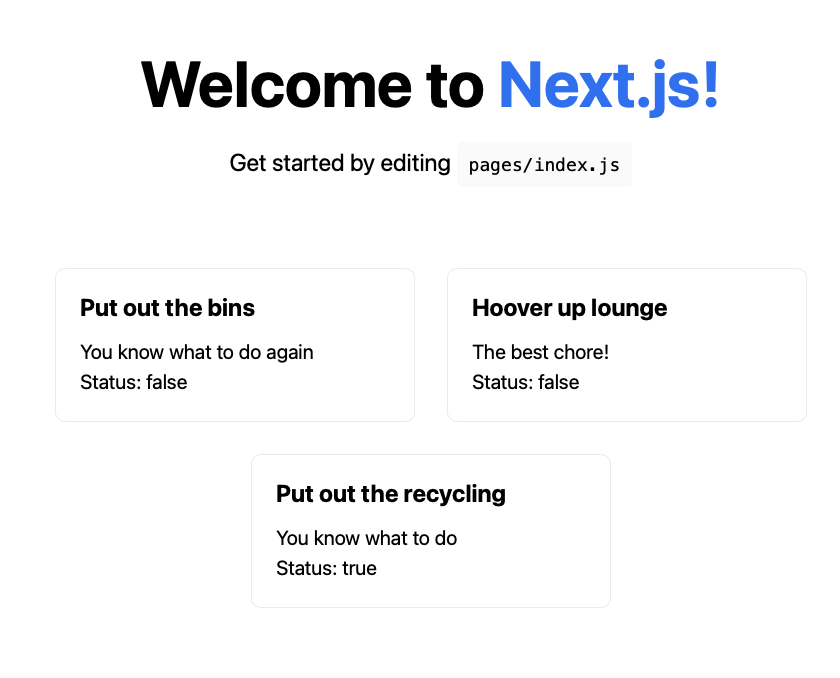
Hmm well it works, kinda. The values are null... what gives? This isn't anything to do with TypeScript, it's that we literally haven't set any value yet for the completed status and null is an appropriate alternative value.
Let's fix that in GraphiQL
mutation MyMutation2 {
  updateTodo(input: {id: "8bce419d-39d5-425b-ab45-00f731e0454e", completed: true}) {
    id
  }
}
Sorted, you should see something like:
Summary
Ok, that's it, done and dusted. Now we have a basis to really deliver on that developer’s vision to "prevent runtime errors for both backend and frontend". We've created a very tight contract between the backend and the frontend with the GraphQL.schema file being the glue. It's a little boilerplate sure but it's a thing of beauty and will let you focus on your productivity and UX rather than bugs.
Inspiration
- https://dev.to/mwarger/aws-amplify-graphql-queries-with-typescript-and-hooks-1e2, opens in a new tab
- https://medium.com/@dantasfiles/using-typescript-with-aws-amplify-api-3788d722869, opens in a new tab
- https://dev.to/stevelizcano/5-minute-tutorial-get-base-types-from-your-aws-amplify-graphql-schema-with-typescript-3636, opens in a new tab