The flow of your app UI is just as important as the interface itself. Yet flows are hard to communicate during the design process, whilst drawing out every state of a flow is far too time consuming.
Enter UI flows — a shorthand for designing the flow of a user interface, imagined by Ryan Singer, opens in a new tab.
The basic composition of a UI flow is as follows:
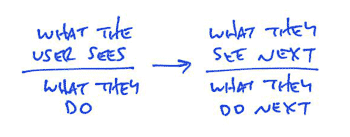
Flow Template
You can hand draw UI Flows and often I start that way but generally I prefer to create a digital version which can be collaborated on and shared easily. The tool I use to do this is Lucid Chart, opens in a new tab, one of my go-to tools for a range of tasks!
I find UI Flows an amazingly quick and simple way to start defining and visualising app requirements. As a method of extracting information from clients the low barrier to understanding and contributing leads to great collaborative sessions that provide increased shared understanding of the solution being developed.
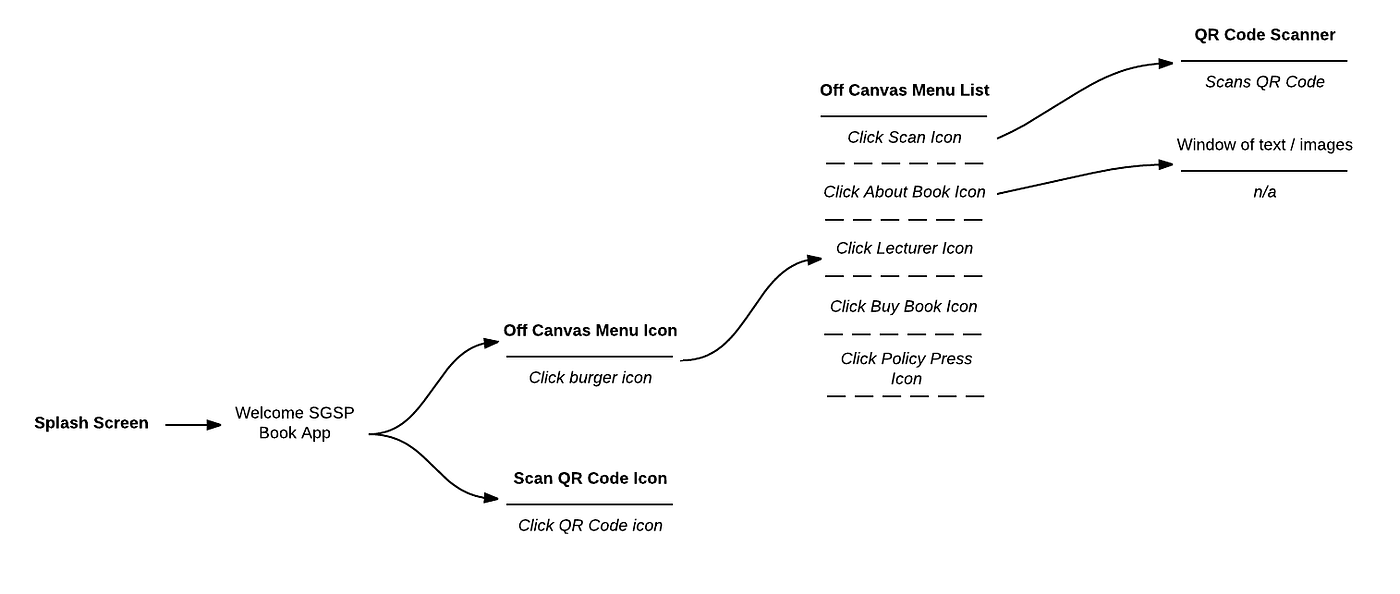
UI Flow from a QR Code scanning app
As the UI Flow is created everybody involved builds up a visual understanding of how the app will look. This makes UI Flows an excellent pre-cursor to wireframe creation. Not only does it make the wireframe requirements a lot clearer, every stakeholder has a shared understanding of the app requirements and is therefore has engagement with the wireframes and able to input into the end solution.
Whilst a UI flow establishes the bare bones functionality of your app, a wireframe starts to integrate associated content and specific user interface elements.