Agent view
Use this site with your AILottie React Native Tutorial
Public page content as Markdown. Copy it into a conversation or give your agent the Markdown link.
/markdown/writing/lottie-react-native
text/markdown
# Lottie React Native Tutorial
Source: https://www.applification.net/writing/lottie-react-native
Markdown: https://www.applification.net/markdown/writing/lottie-react-native
Published: 2017-04-27
Updated: 2022-02-13
> **TLDR** =\> Lottie is a mobile library for Android and iOS by AirBnb that enables you to embed highly performant JSON based Adobe AfterEffects animations into your mobile app to provide those user experience delighters.
> This tutorial will walk you through how to get Lottie animations working with React Native.
First up lets see some Lottie Animations :-)

Lottie Animations
Although creating them with AfterEffects will require a designer, you can find a growing list of open source lottie animations at [LottieFiles.com](http://LottieFiles.com).
**[LottieFiles - Free high quality Lottie animation files](http://www.lottiefiles.com/)**
*[A collection of curated animation files for Lottie (Airbnb). Use these and make your Apps and the internet ](http://www.lottiefiles.com/)**[prettier.](http://prettier.www.lottiefiles.com)*[www.lottiefiles.com](http://prettier.www.lottiefiles.com)
**Setting Up Lottie React Native**
Thanks to airbnb you can make use of these animations in your React Native app, the repo and official docs can be found at:
**[airbnb/lottie-react-native](https://github.com/airbnb/lottie-react-native)**
*[lottie-react-native - Lottie wrapper for React ](https://github.com/airbnb/lottie-react-native)**[Native.](http://Native.github.com)*[github.com](http://Native.github.com)
Unfortunately it can be difficult getting started as the docs assume a certain amount of native iOS and Android experience which isn’t necessarily the case for React Native developers. If you aren’t careful the docs can inadvertently send you down a time-consumingly wrong path.
**Warnings**
In the installation section **DO NOT **be fooled into thinking you have to install the related projects “Lottie for iOS” and “Lottie for Android”. You do not and it will lead to pain!
Unless you are adding Lottie to an existing XCode project where you already use CocoaPods **DO NOT** follow the Podfile instructions. It will also lead to pain!
As things change it’s also worth noting the version this tutorial uses:
- *React Native 0.43.1*
- *XCode 8.2.1*
- Android SDK 25
- Lottie 1.5.3
- Node 7.60
Throughout this tutorial I’m using Yarn but feel free to replace with NPM commands if that’s your
Ok warnings mentioned lets have a go at creating an app from scratch with Lottie animations.
**Create a new React Native app**
**Install Lottie**
**Link Lottie**
**Manual Configuration iOS**
According to the official docs the above should be enough to get things working, however, I’ve always had to configure some things manually too.
So next up open up your XCode project from the ios folder. In my case it is:
*/ios/lottieloader.xcodeproj*
Select your app and the *General* settings section to see the *Linked Frameworks and Libraries *section. You’ll note the react-native link commands we just ran have added the following files:
- libLottie.a
- libLottieReactNative.a
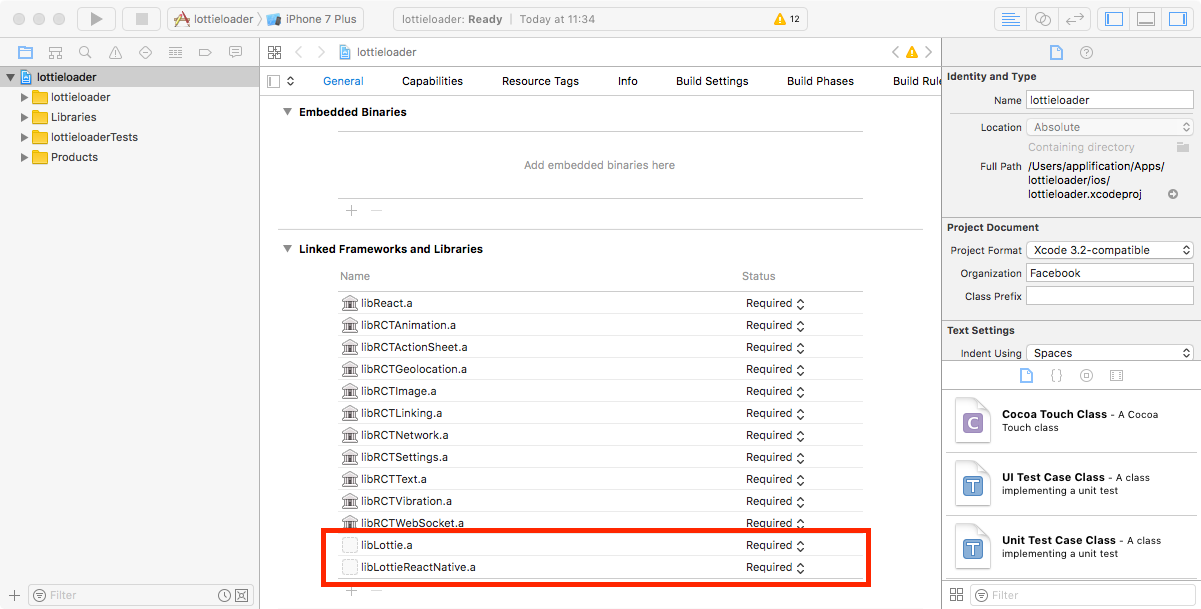
However as mentioned this isn’t quite enough. In the *Embedded Binaries* section above click the + icon and add the Lottie.framework.iOS from **Lottie.xcodeproj**
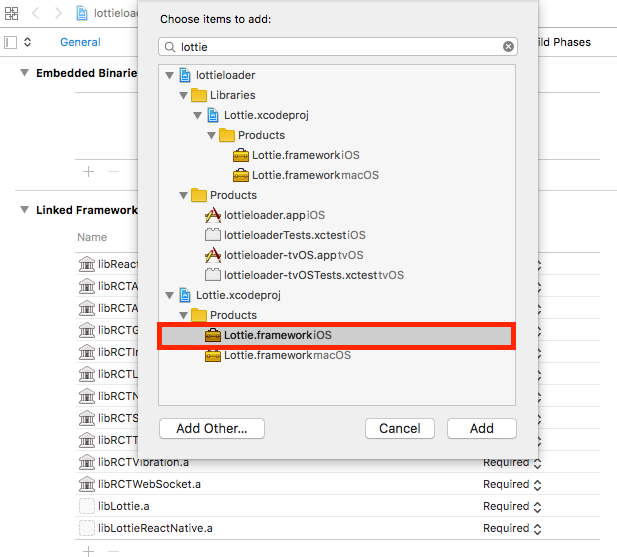
You should now also see the Lottie.framework in your Linked Frameworks and Libraries and everything should be set up for iOS now.
**Manual Configuration Android**
So on to Android. As the official docs mention you will need to use **Android support library version 25**. If you don’t have it you will need to install it with the Android SDK manager.
The React Native CLI uses version 23 by default so as the official docs say we’ll need to open the *android/app/build.gradle* file and update to version 25. However, whilst the official docs say just need to update the **compileSdkVersion** I’ve found you need to do a little more! It’s also important to update the **buildToolsVersion**, **targetSdkVersion, **the **appcompat dependency** whilst also adding **lottie** as a dependency too.
Based on my Android SDK installation the settings I had to change are as follows:
If you are having issues a good place to look for reference is the example project in the Lottie-React-Native repo [https://github.com/airbnb/lottie-react-native/blob/master/example/android/app/build.gradle](https://github.com/airbnb/lottie-react-native/blob/master/example/android/app/build.gradle)
**Setting up React Native Lottie Animation**
For this example I’m going to use the soda loader animation from LottieFiles
**[Soda Loader - LottieFiles](http://www.lottiefiles.com/94-soda-loader)**
*[A collection of curated animation files for Lottie (Airbnb). Use these and make your Apps and the internet ](http://www.lottiefiles.com/94-soda-loader)**[prettier.](http://prettier.www.lottiefiles.com)*[www.lottiefiles.com](http://prettier.www.lottiefiles.com)
Download this JSON file and save it an a folder called *assets* in your React Native project.
Then in your index.ios.js file copy and paste the following:
There is nothing special in this gist, we are just importing **Animation** from ‘lottie-react-native’ and our *soda\_loader.json*. We the use the **Animation** tag to set the source as per the offical docs.
Now if you run *react-native run-ios* you should see a nice screen with an animation like this:

**Android Bug**
Now in theory the same code should work on Android too… but it doesn’t because there is a bug resolving the file path.
**[lottie-android 1.5 support in react native? · Issue #78 · airbnb/lottie-react-native](https://github.com/airbnb/lottie-react-native/issues/78)**
*[I was really excited to hear that pre-compositions and images are now supported in the last version of Lottie for…](https://github.com/airbnb/lottie-react-native/issues/78)*[github.com](https://github.com/airbnb/lottie-react-native/issues/78)
The work around is to copy your JSON animation to the android project folder. Create an *assets* folder at *android/app/src/main/* and copy the soda\_loader.json file from your assets directory to it.
Then change the Animation tag source to *source=”soda\_loader.json” *to load it from the Android folder as opposed to the React Native assets folder*. *Full code for android:
Run *react-native run-android* and you should see the same animation on Android!
The full source for this example can be found at:
**[Dave Hudson / lottie-react-native](https://gitlab.com/applification/lottie-react-native)**
*[Lottie animation example with React ](https://gitlab.com/applification/lottie-react-native)**[Native](http://Nativegitlab.com)*[gitlab.com](http://Nativegitlab.com)
## Explore Applification
- [Home](https://www.applification.net/markdown)
- [About Dave](https://www.applification.net/markdown/about)
- [Client work](https://www.applification.net/markdown/client-work)
- [Products](https://www.applification.net/markdown/products)
- [Writing](https://www.applification.net/markdown/writing)
- [Agents & API docs](https://www.applification.net/markdown/agents)
- [Contact routes](https://www.applification.net/about)
- [LinkedIn](https://www.linkedin.com/in/hudsond/)